Legacy System Modernization: Rewrite, Refactor or Replatform?
Rewrite, refactor, replatform, rehost, replace or migrate step by step? A decision table, four traps and a checklist to run before you choose a modernization path.
In short
- Six paths compared in one table: rehost, replatform, refactor, rewrite, replace and incremental (strangler fig)
- Fowler and Microsoft describe gradual replacement as lower risk than a big-bang rewrite, at the cost of transitional architecture
- Four traps: hidden business logic, data migration, parallel run and undocumented integrations
- Check first what the system does, who understands it, and whether you have the source code
Contents7 sections
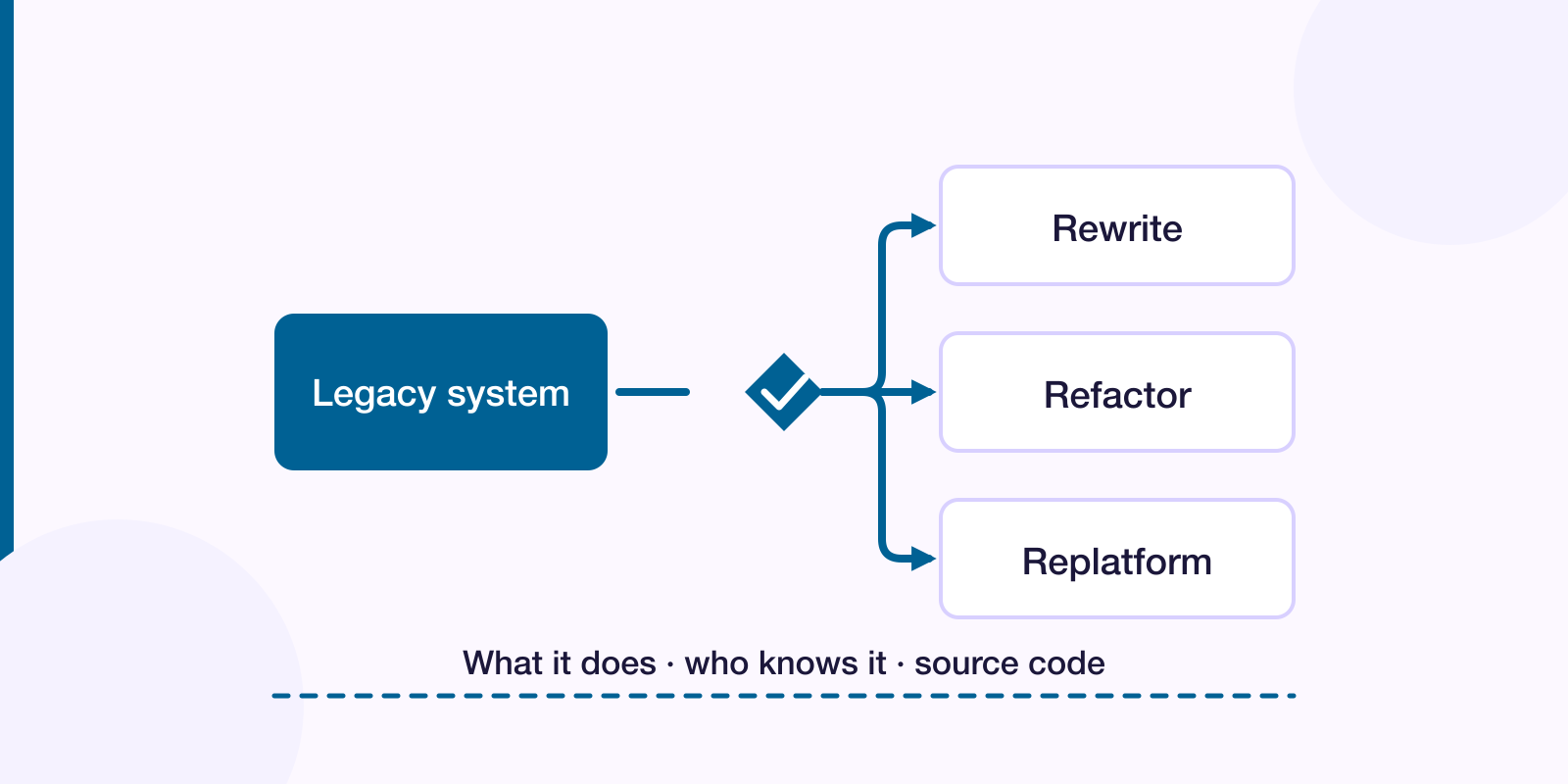
There is no single right path for legacy system modernization. Rewrite from scratch mainly when the system is small or its behavior is well documented. For most larger systems, replacing it piece by piece (the strangler fig approach) is less risky. If the problem is the hosting platform rather than the application, replatform; if only the integrations are missing, wrap the old core in an API. Three things decide it: what the system actually does, who understands it, and how long the business can live with two systems at once. Age alone is not a reason to replace anything. A stable old system can be cheap to run, while a rewrite can break a process that works.
This article is for CIOs, IT managers and owners of mid-size companies. It compares rewrite vs refactor, replatform, rehost and replace in one decision table, explains the incremental alternative, and describes four traps that commonly stall modernization projects.
The vocabulary: the same words mean different things
#The term "refactor" is the best example. In software engineering it means restructuring code without changing its behavior. In cloud migration guides it means changing the application's architecture to use cloud-native features. AWS calls refactor (or re-architect) the most complex and costly of its seven migration strategies (the "7 Rs": retire, retain, rehost, relocate, repurchase, replatform, refactor). For large migrations it recommends rehosting, relocating or replatforming first and modernizing afterward (AWS Prescriptive Guidance). Google Cloud uses similar labels (rehost, replatform, refactor) and adds rebuild, "remove and replace" (Google Cloud Architecture Center).
These frameworks were written for moving workloads to the cloud, so they do not map one to one onto an on-premises information system. In this article the terms mean the following:
- Rehost: move the application as it is to a new server, virtual machine or hosting. No application changes.
- Replatform: keep the application's design, but change part of what it runs on, for example the operating system, runtime or database. The application may need some changes.
- Refactor: change the internal structure or architecture of the existing application while keeping what it does for users.
- Rewrite (rebuild): build a new system and retire the old one.
- Replace (repurchase): buy a ready-made product or SaaS and migrate to it.
- Incremental replacement (strangler fig): move functions to a new system step by step while the old one keeps running.
Decision table: which path fits
#| Path | Fits when | Main risk | Warning sign |
|---|---|---|---|
| Rehost | The problem is hardware or hosting. The application itself works and needs no change. | You move the problems along with the system. Google Cloud notes that after a rehost, workloads are not optimized for the cloud. | The application depends on an unsupported component that does not run in the new environment. |
| Replatform | The platform is the problem (end of support for the operating system, runtime or database), while the application logic is sound. | More work and more testing than a plain move; the new platform may need code changes. | Nobody can say which parts of the code depend on the old platform. |
| Refactor | You have the source code and tests (or can build them), and the main pain is that changes are slow and risky. | Needs a team that knows the codebase; benefits are invisible to users until the end. | No automated tests and no one who knows the code well. |
| Rewrite | The system is small, its rules are documented, the technology is a dead end, and new requirements can wait. | Long project with no value for users until cutover; missed behavior of the old system. | "We will document the rules as we go." |
| Replace | The function is a standard one (accounting, HR, CRM) and a product covers most of it. | You adapt your process to the product; data migration and integrations remain your work. | The business process is your competitive differentiator. |
| Incremental (strangler fig) | The system is large or critical, must run during the change, and has a boundary where it can be split. | Transitional architecture and two systems running together; without a clear end it drags on. | No access to the source code or to any point you can change, such as the database. |
Paths combine. A common sequence is to rehost or replatform first to remove an urgent risk, then replace functions step by step. If end of support of a Microsoft platform is what forces your hand, our article on SharePoint 2016/2019 end of support shows how that decision looks in one specific case.
Illustrative example: an order-handling application runs on an operating system that is losing support, and its code is stable and well understood. Rehost or replatform solves the urgent problem; a rewrite would take on far more risk.
The incremental path: how the strangler fig approach works
#Martin Fowler named the approach after strangler figs, vines that grow around a host tree and eventually replace it. Fowler writes that the simple-sounding plan of replacing a legacy system in one go has, in his experience, gone "down in flames most of the time". Replacing a serious IT system takes a long time, and users cannot wait for new features. Gradual replacement lets the business reap value from new components earlier. It also needs temporary code so that old and new can coexist. That may look like waste, but Fowler says the reduced risk and earlier value outweigh the cost (Fowler, Strangler Fig Application).
Microsoft's Azure Architecture Center describes the mechanics in four phases:
- A facade (proxy) is placed between clients and the legacy system. At first it sends most requests to the legacy system.
- With each iteration, more requests go to the new system.
- When nothing depends on the legacy system, it is decommissioned.
- The facade is removed, or kept as an adapter for older clients.
The same page lists when the pattern may not fit: when requests to the back end cannot be intercepted, when you have no access to the source code and no other point you can change (such as the database), when the system is small and easy to replace in one go, or when you must retire the original quickly. It also warns that the facade must not become a single point of failure or a bottleneck (Microsoft Learn, Strangler Fig pattern).
While both systems run, they must talk to each other. Microsoft recommends an anti-corruption layer for that: an adapter that translates between two systems with different semantics, which protects the new system's design from legacy semantics. Microsoft lists the costs: the layer adds latency and one more service to maintain, and you must decide whether it is temporary or permanent. The page also says to focus the layer on translation logic and avoid putting business rules or orchestration in it (Microsoft Learn, Anti-corruption Layer).
Four traps that sink modernization projects
#1. Hidden business logic
Over the years a system collects rules nobody wrote down: an exception for one customer, a rounding convention, an approval sequence, data fixes made directly in the database. The new system does not know them until they surface in production. Walk through real processes with the people who use the system, read the code and stored procedures, and compare the outputs of old and new on real data. Fowler adds that much of the old behavior is not really wanted, so the goal is not blind copying but a deliberate decision about each rule.
2. Data migration
Data is often harder than code. Old schemas have inconsistent formats, duplicates and values that have no place in the new model. Microsoft's database example for the strangler fig pattern extracts one domain at a time into its own database, loads its historical data, keeps the two databases in sync, and validates consistency before cutover. Rollback is possible only while the old tables and synchronization still exist. After they are removed, going back means restoring them and replaying changes, which Microsoft says significantly increases effort and risk. Treat removal of the old objects as a deliberate final step for each domain.
3. Parallel run
With incremental replacement, two systems live side by side. Decide which one is the system of record for which data, how data is synchronized, and what users see. Microsoft says to plan how services and data stores used by both systems will be handled. Plan for extra load on support and training. Write down what gets switched off after each stage; temporary architecture without an end date tends to stay.
4. Integrations
Old systems accumulate connections: file exports, scheduled jobs, direct database reads by other applications, reports in spreadsheets. Some of them are undocumented, and you find them when they break. Make an inventory of every system and person that reads from or writes to the legacy system before you change anything. The boundary between old and new is itself an integration problem, so the facade and translation layer need the same design effort as the new system.
Checklist before you commit
#| Question | If yes | If no |
|---|---|---|
| Is it documented what the system does, and can it be verified on real data? | Rewrite or incremental replacement is realistic. | Map the behavior first, then choose. |
| Do you have the source code and database access, and the right to change them? | Refactor, replatform and incremental paths are open. | Consider wrapping it in an API, replacing it with a product, or a rewrite from mapped behavior. |
| Does more than one person understand the system? | Knowledge can be spread across stages. | Capture knowledge first, before development starts. |
| Can the business work with two systems for a period? | Incremental replacement is possible. | A single cutover is the alternative, with higher risk and a rehearsed rollback. |
| Is the problem the platform rather than the application? | Rehost or replatform. | Moving alone will not fix it. |
Every path is a trade-off. Incremental replacement lowers risk but takes longer and needs transitional architecture. A rewrite is easier to manage when the scope is small, but scope growth and new requirements during the project work against it.
What Partner Soft's website says about modernization
#Partner Soft describes itself as a software company on the market since 1997. Its services list "optimization and modernization" under custom software development and say the company can connect and modernize SAP and Microsoft environments. The homepage also lists legacy modernization among the areas it covers for enterprise and mid-market clients, and shows case studies of projects delivered since 1997.
Frequently asked questions
#Rewrite vs refactor: which is cheaper?
There is no general answer. A rewrite looks simpler on paper but carries the risk of missed behavior and a long wait for value. Refactoring spreads the work out but needs a codebase and a team that can change it safely. Only an assessment of the actual system can compare them.
When does it make sense to replatform a legacy system?
When the application logic is sound and the problem sits in what it runs on, such as an operating system or database that is losing support. Expect more work than a plain move, because the application may need changes to run on the new platform.
If you are weighing these options for your own system, tell us which system you run and where it slows the business down. We reply within 24 hours.
Sources
- Strangler Fig Application, Martin Fowler, martinfowler.com
- Strangler Fig pattern, Microsoft Learn, Azure Architecture Center
- Anti-corruption Layer pattern, Microsoft Learn, Azure Architecture Center
- About the migration strategies (7 Rs), AWS Prescriptive Guidance
- Migrate to Google Cloud: Get started, Google Cloud Architecture Center

Matúš Lukačik
Project Manager at Partner Soft, managing software development and integration projects and coordinating the team and client communication.
Need software that cannot fail?
We develop and operate custom software for environments with high reliability requirements.
Related articles
Partner Soft becomes a Hikvision technology partner
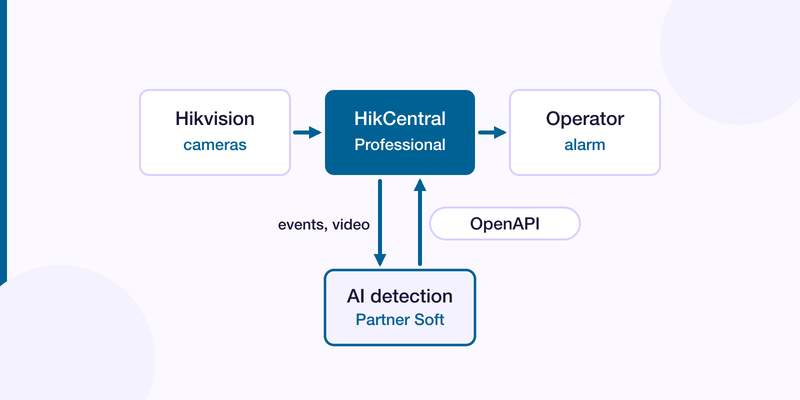
Partner Soft is now an integration partner in the Hikvision Technology Partner Program. We connect AI detection and custom applications to Hikvision cameras via HikCentral OpenAPI.
SharePoint 2016/2019 End of Support: What to Do Now
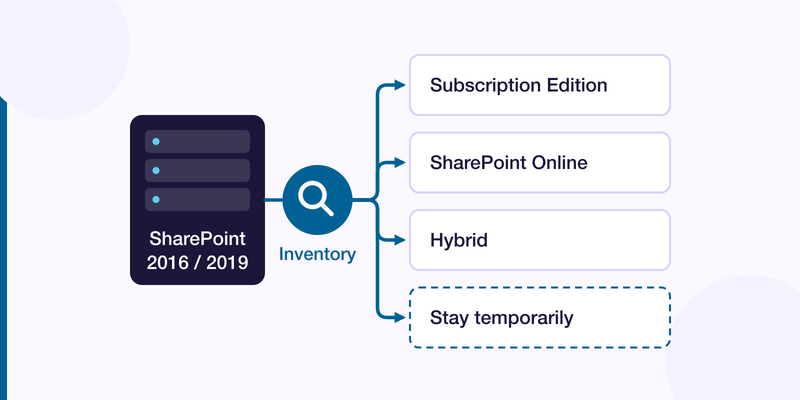
Your options now that SharePoint Server 2016 and 2019 are out of support, plus a decision table and the inventory to run before you choose a migration path.